


Further Reading: PLBs (Personal Locator Beacons) – UNSW Outdoors Club
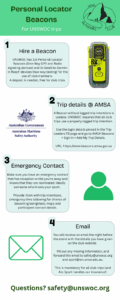
PLBs do not give an exact location, especially if you're in a canyon or under canopy. Therefore for the PLB to be useful, before every trip, you must add your trip details and your own emergency contact(s) to your PLB at the AMSA website.
If you are a Trip Leader and logged in, you will see the club's AMSA logins and a how-to video here:
(redacted).
If this is incorrect, or you otherwise need the login details, please contact one of the Exec.
- Log in and select ‘Add my trip details’. Find your club beacon in the list (UNSWOC01-UNSWOC08).
- Enter clear information about your trip detailing:
- Date(s) of trip
- Name of destination (canyon/crag etc.) or journey description
- Location description, nearest road and suburb
- Latitude and Longitude of Destination (google maps and sixmaps can give you this)
- Number of party members
- Food/water supplies carried
- Upload a map of your intended route (which you should have as a prepared trip leader!)
- Hit ‘Save’
- Under ‘Emergency Contacts’ tab hit ‘Add new emergency contact’ (please remove emergency contacts that are not the Safety Officer or another Exec member as they are from a previous trip). Enter their name and number and hit save. Send/leave a copy of your trip description (written in step 4) with this emergency contact.
- Allocate your PLB to the emergency contact. If you cannot find your PLB, go to the `Beacons` tab and find your beacon, remove an existing contact (maximum 3) and add your own. Always have 3 contacts there as backups.
- The night before your trip, you will receive an automatic email with your trip details. Review and forward this to the club safety officer safety@unswoc.org and arc sport.
Or click the below picture if that's more your thing: